You're two days out from a five-day trip to Barcelona with four friends. Someone asks: "What are we doing Thursday?"
What follows is fifteen minutes of scrolling. You check the group chat — nothing useful, just 300 messages about restaurant recommendations buried between memes. You open your Notes app, where you saved that walking tour link three weeks ago. You check your email for the cooking class confirmation. You text the friend who booked the day trip to Montserrat to ask what time that starts.
Fourteen separate pieces of trip information, scattered across seven different apps, owned by five different people. And this is for a trip you've been planning for months.
Your itinerary isn't missing. It's everywhere — which is the same thing.
The Tool You're Using Wasn't Built for This
Most people try to organize trip itineraries with tools that were designed for something else entirely. And the mismatch creates problems that compound as trips get longer and groups get bigger.
Google Calendar is built for recurring events in a single person's life — your dentist appointment, your weekly standup, your kid's soccer practice. It has no concept of a multi-day trip with shared ownership. You can create events and share a calendar, but there's no way to attach a confirmation number to a dinner reservation, no way to see who added what, and no way to view the full trip as a cohesive plan rather than a list of time blocks. Try planning a seven-day itinerary in Google Calendar and you'll spend more time fighting the tool than using it.
Notes apps are where trip details go to die. You copy a restaurant recommendation into Apple Notes, screenshot a museum's hours into your camera roll, and save a flight confirmation in a separate note. Three weeks later, you can't remember which note has what, and half the information is outdated because someone changed the reservation.
Group chats are the worst of all. Trip details in a group chat have a half-life of about six hours before they're buried under new messages. There's no way to pin, organize, or retrieve them reliably. We've written about why scattered tabs and tools sabotage trip planning — the short version is that they're designed for conversation, not coordination.
Shared Google Docs get closer, but they're static. A bulleted list of activities organized by day gives you structure but no visualization. You can't see at a glance that you've packed three activities into Monday morning and left Wednesday completely empty. You can't drag an activity from one day to another. And keeping the document updated requires manual effort that usually falls on one person.
What a Purpose-Built Trip Calendar Actually Looks Like
A trip itinerary calendar isn't just a regular calendar with vacation events on it. It's a fundamentally different view of your trip — one that's organized around days and experiences rather than hours and appointments.
Here's what separates a real trip calendar from a repurposed productivity tool:
Day-by-day structure. Instead of a weekly grid with hourly slots, a trip calendar shows you each day of your trip as a unit. Monday has a morning hike, an afternoon at the beach, and a dinner reservation. Tuesday has a day trip and an evening cooking class. You can see the shape of your entire trip at a glance — where the packed days are, where the breathing room is, and where the gaps need filling.
Rich detail on each entry. Every item on the calendar carries context: the address, the confirmation number, the cost, who booked it, relevant notes. When you tap on "Dinner at Cal Pep" you don't just see "7:30 PM" — you see the reservation confirmation, the address, the note that says "ask for the bar seats," and the fact that it costs about 45 euros per person.
Shared ownership. Everyone in the group can see the same calendar. Everyone can add to it, edit it, and comment on it. There's no single "trip planner" who holds all the information — the itinerary belongs to the group.
Visual balance. A good trip calendar makes it obvious when your itinerary is lopsided. If you've stacked four activities on Saturday and have nothing planned for Sunday, you can see that instantly and rebalance. This is nearly impossible in a text-based list or a group chat thread.
The Case for Syncing With Google Calendar
Even with a purpose-built trip calendar, there's a strong case for syncing your itinerary to Google Calendar once it's finalized. The reason is simple: when you're actually on the trip, you need information in the tool you're already checking — your phone's calendar.
A good sync does a few things:
Puts trip events alongside your real life. If you have a flight at 6 AM on Friday, that needs to show up next to the Thursday night reminder to pack. If you have a work call you couldn't reschedule on Monday morning, that needs to be visible alongside the group's Monday plans.
Sends notifications. Your phone's calendar can push reminders — "Cooking class starts in 1 hour" — without you having to open a separate app.
Works offline. Calendar events sync to your phone and are available without cell service. When you're in a rural area with no signal, you can still pull up the address of the restaurant or the time of the ferry.
The key is that syncing should be one-directional and automatic. You build and edit the itinerary in the trip planning tool, and it pushes to Google Calendar. You don't want people editing events in Google Calendar and creating conflicts with the source of truth.
How Plan Harmony Brings This Together
Plan Harmony was built around the idea that your trip itinerary should be visual, shared, and connected to everything else — your budget, your group's decisions, and your personal calendar.
Here's what the calendar experience looks like in practice:
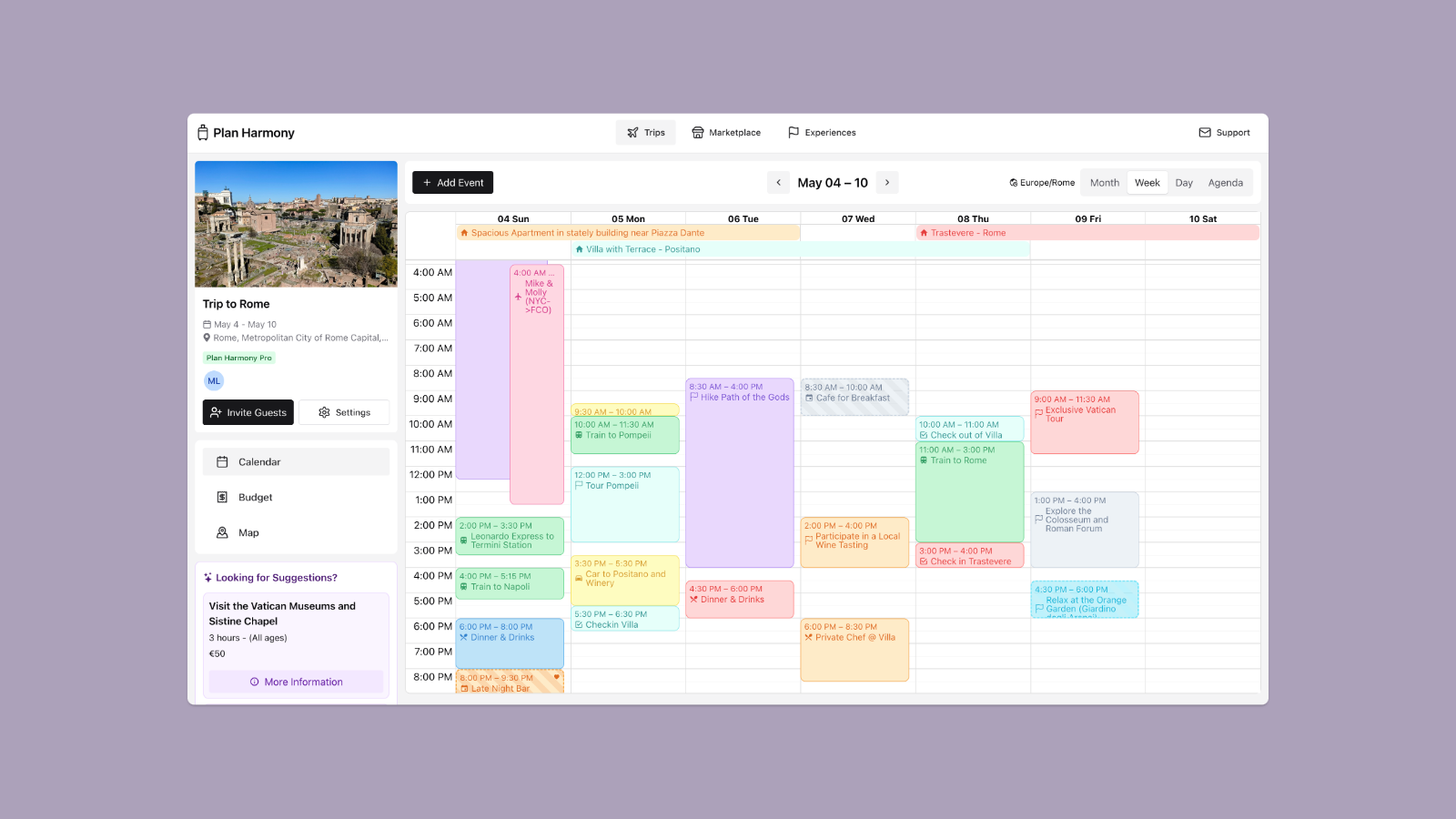
A visual day-by-day itinerary. When you open a trip in Plan Harmony, you see your itinerary laid out across the days of your trip. Each day shows what's planned, in order, with enough detail to be useful at a glance. You're not scrolling through a text list — you're looking at the shape of your trip.
Everything in one place. Flights, hotels, restaurants, activities, transportation — every component of your trip lives on the same calendar. No more cross-referencing your flight confirmation email with your hotel check-in note with your activity spreadsheet. It's all there, in sequence, on the days when it matters.
Group visibility. Every member of the trip sees the same itinerary. When someone adds a restaurant reservation or moves a museum visit to a different day, everyone sees the update. No more "wait, I thought we were doing that on Wednesday" confusion.
Google Calendar sync. Once your itinerary is set, Plan Harmony can sync it to your Google Calendar. Your trip events appear alongside your regular calendar, with all the details attached. During the trip, you get the convenience of your phone's native calendar with the richness of a full trip plan behind it.
Connected to your budget. This is where a trip-specific calendar diverges most from a general-purpose tool. Activities on your Plan Harmony itinerary are connected to your trip budget. When you add a $120 snorkeling excursion to Thursday's schedule, that cost is reflected in your activity budget. You can see — in the same view — whether your itinerary fits your finances.
Smart suggestions for gaps. Plan Harmony's smart suggestions feature can identify gaps in your itinerary and recommend activities based on your destination, your interests, and what's already planned. Instead of staring at an empty Wednesday afternoon wondering what to do, the tool surfaces ideas that fit your trip.
Building an Itinerary That Doesn't Fall Apart
A trip calendar is only as good as the process for building it. Here are a few principles that keep itineraries organized from the first draft to the last day of the trip:
Start with the fixed points. Flights, hotel check-in and check-out times, and any pre-booked activities with specific time slots. These are your anchors. Everything else fits around them.
Block rest time intentionally. The most common itinerary mistake is overscheduling. If every hour of every day is committed, the trip will feel like a forced march by day three. Build in unstructured blocks — mornings with no alarm, afternoons with no plan. Your future self will thank you.
Assign an owner to each booking. For every reservation or ticket, someone in the group should be the designated point of contact. Not because they're "in charge," but because when the restaurant calls to confirm, one person needs to answer. A trip calendar that shows who booked what prevents the "I thought you had the confirmation" moment.
Finalize the itinerary with the group, not for the group. The best itineraries are collaborative. If one person builds the entire plan and presents it as a fait accompli, the rest of the group feels like passengers, not participants. Use a shared tool where everyone can contribute — and check out the stress-free trip planning guide for more on how to make that process smooth.
Review the full calendar before the trip. Two or three days before departure, the whole group should look at the finalized itinerary together. Flag anything that looks too packed, too empty, or logistically impossible — like a dinner reservation across town fifteen minutes after a museum visit. This is much easier when you can see the whole trip visually rather than reading a bulleted list.
Your Trip Deserves Better Than Scattered Notes
Every group trip has two phases: the planning phase, where information is scattered across a dozen tools and threads, and the execution phase, where you need that information organized, accessible, and in one place. A purpose-built trip itinerary calendar bridges those two phases. It gives you the visual structure to plan well and the practical utility to travel well.
Stop losing confirmations in group chats. Stop scrolling through notes apps for that one restaurant link. Stop fighting with Google Calendar to show you something it was never designed to show.
Start planning your trip on Plan Harmony — where your entire itinerary lives in one visual, shared, syncable calendar.
Enjoyed this article?
Share it with fellow travelers planning their next adventure.